Set the frame interval for the NEO-M8L
Goal
Using a Python script, it should be possible to change the position update interval of a NEO-M8L GNSS module from 1 Hz to 10 Hz. This allows the location to be updated not just once per second, but up to 10 times per second.
Prerequisites
NetModule Wireless Router with wireless connection
-
Not available for legacy products NB1600, NB2700, NB3700, NB3710
**
The wiki was tested with router software 5.0.0.104
**
1. Set up the LXC Contianer
Activate the LXC container on the router
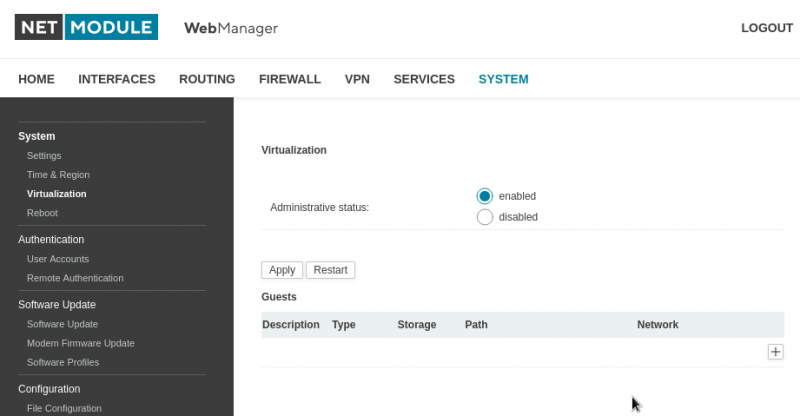
In the second step, the image of the LXC container in this case, a Debina 13 (trixie).
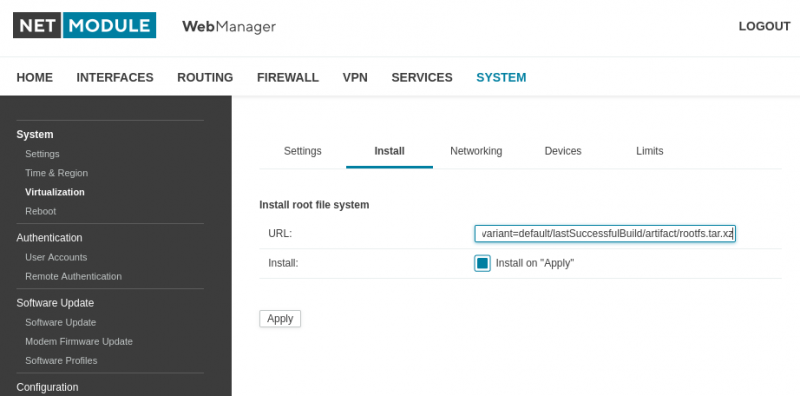
The easiest way to do this is to install the whole thing over the Internet. However, the router requires a mobile connection to the Internet.
From a Jenkins server you get the current image for the container
* Jenkins Server Page image-debian / Link
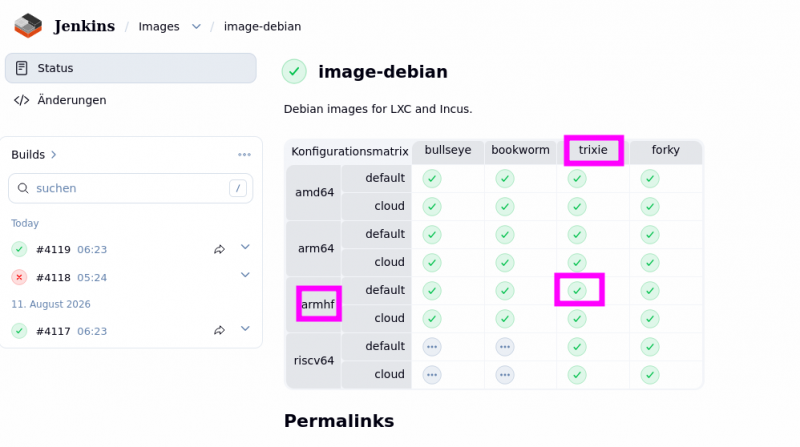
Here you can download a Debian image for various systems and versions.
The armhf tab is important here, and trixie
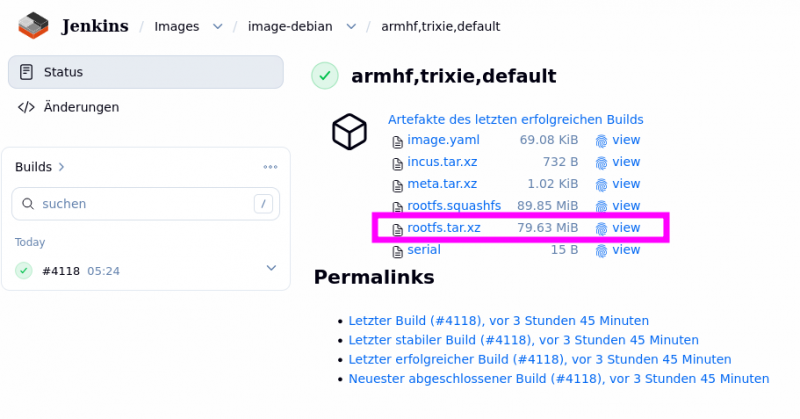
The image is the “rootfs.tar.xz” which is required. With a right click you can copy the link.
It would be structured like this:
https://jenkins.linuxcontainers.org/view/Images/job/image-debian/architecture=armhf,release=trixie,variant=default/4118/artifact/rootfs.tar.xz
When the “Apply” button is pressed, Debian will be installed.
Set up the LXC container further. A network interface is enabled here.
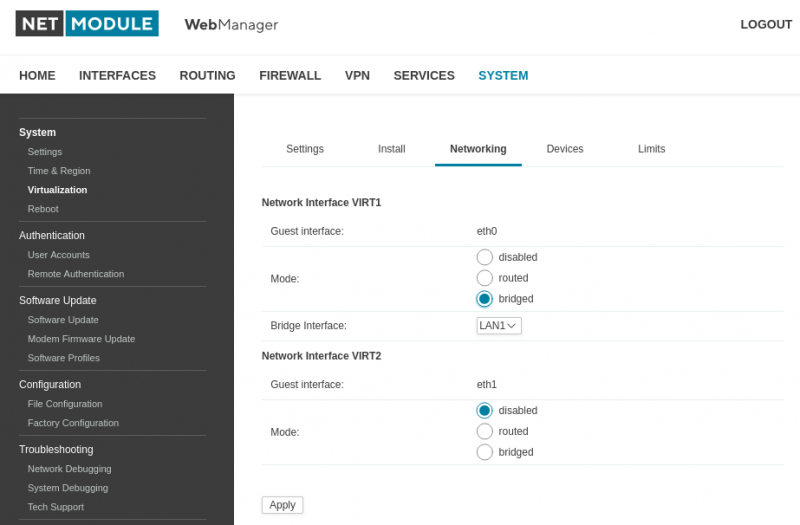
The container has now also been assigned an IP address.
USER
~ $ lxc-info guest0
Name: guest0
State: RUNNING
PID: 2255
IP: 192.168.1.149
CPU use: 1.57 seconds
BlkIO use: 4.00 KiB
Memory use: 6.29 MiB
KMem use: 1.18 MiB
Link: virt0
TX bytes: 2.28 KiB
RX bytes: 853 bytes
Total bytes: 3.11 KiB
~ $
Always assign a fixed IP address for the LXC container via the DHCP server.
The MAC address of the LXC container is 00:FF:AA:00:44:00.
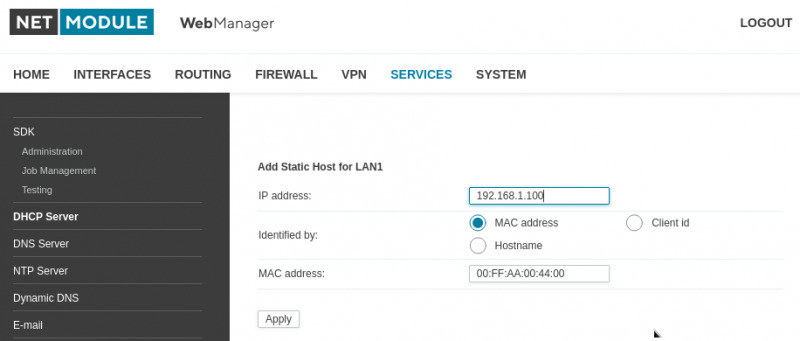
Log in to the LXC container and test whether it can access the Internet.
USER
~ $ lxc-attach guest0
root@LXCNAME:~#
ping quad9.net
PING quad9.net (195.176.255.138) 56(84) bytes of data.
64 bytes from 195.176.255.138 (195.176.255.138): icmp_seq=1 ttl=51 time=37.0 ms
64 bytes from 195.176.255.138 (195.176.255.138): icmp_seq=2 ttl=51 time=40.9 ms
— quad9.net ping statistics —
2 packets transmitted, 2 received, 0% packet loss, time 3006ms
rtt min/avg/max/mdev = 28.823/36.685/40.937/4.768 ms
root@LXCNAME:~#
The container is installed and set up. Now you can set up further tools on the container.
Customize the LXC configuration
Adjust the LXC configuration so that the /dev/ttyUSB1 interface is available within the container.
USER
~ $ ls -l /dev/tty*
crw-rw-rw- 1 root root 5, 0 Sep 30 09:17 /dev/tty
crw——- 1 root root 166, 0 Sep 28 17:55 /dev/ttyACM0
crw——- 1 root root 166, 1 Sep 28 17:55 /dev/ttyACM1
crw——- 1 root root 166, 2 Sep 28 17:55 /dev/ttyACM2
crw——- 1 root root 166, 3 Sep 28 17:55 /dev/ttyACM3
crw——- 1 root root 249, 0 Sep 28 17:55 /dev/ttyNull0
crw——- 1 root root 4, 64 Sep 28 17:55 /dev/ttyS0
crw——- 1 root root 4, 65 Sep 28 17:55 /dev/ttyS1
crw——- 1 root root 188, 1 Sep 29 17:26 /dev/ttyUSB1
crw——- 1 root root 188, 2 Sep 29 17:32 /dev/ttyUSB2
crw——- 1 root root 188, 3 Sep 29 17:32 /dev/ttyUSB3
crw——- 1 root root 188, 4 Sep 29 17:32 /dev/ttyUSB4
crw——- 1 root root 188, 5 Sep 29 17:32 /dev/ttyUSB5
crw——- 1 root root 188, 6 Sep 29 17:32 /dev/ttyUSB6
~ $
The entry /dev/ttyUSB1 is important; this interface gives us access to the GNSS module.
**
This change is made directly in the router software. When updating the router software, this entry must be made again because it is not part of the official software.
**
Add these entries to the end of the config file.
~ $ vi /etc/lxc/guest0/config

# Setting up a USB drive in the LXC container
lxc.cgroup.devices.allow = c 188:1 rwm
lxc.mount.entry = /dev/ttyUSB1 dev/ttyUSB1 none bind,optional,create=file 0 0
2. Make additional settings in the container
USER
~ $ lxc-attach guest0
root@LXCNAME:~# apt install gpsd python3-gps gpsd-clients python3-paramiko nano
root@LXCNAME:~#
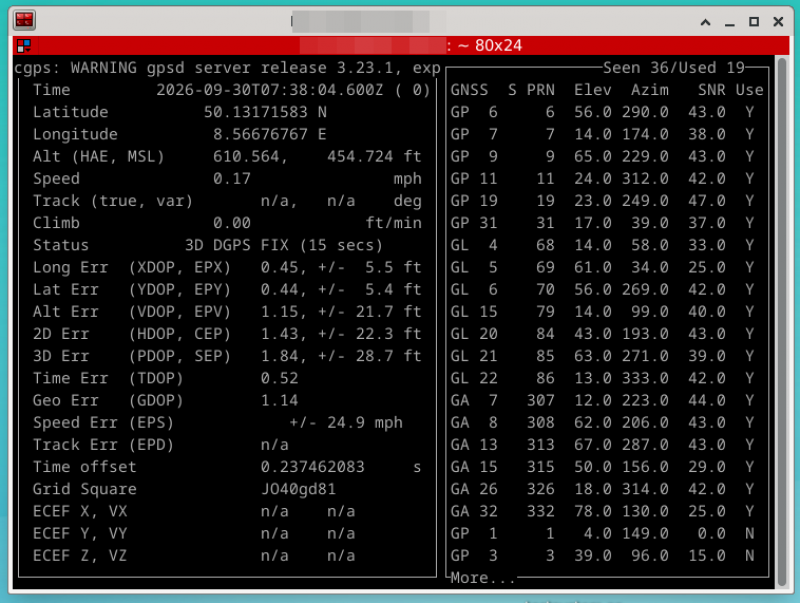
The next step is to perform a basic test of access to the GNSS module.
USER
~ $ lxc-attach guest0
root@LXCNAME:~# cgps -s 192.168.1.1:2947
root@LXCNAME:~# cgps: WARNING gpsd server release 3.23.1, expected 3.25,
API: 3.14
root@LXCNAME:~#
The GNSS data is then clearly displayed in the console using a Python plotting tool.
To configure the frame interval, you'll need Python programs and a library.
Create a subfolder for the whole thing
USER
root@LXCNAME:~# mkdir ubx_neo_m8l
root@LXCNAME:~# cd ubx_neo_m8l
root@LXCNAME:~# ls -l
root@LXCNAME:~/ubx_neo_m8l/# ls -l
-rwxr-xr-x 1 root root 1055 Sep 29 13:37 set_cfg_rate_neom8l.py
-rwxr-xr-x 1 root root 2642 Sep 29 15:21 ssh_start.py
drw-r–r– 3 root root 4096 Sep 29 13:33 ubxlib
root@LXCNAME:~/ubx_neo_m8l/
The script set_cfg_rate_neom8l.py can be downloaded via the View Code link, and the ubxlib can be downloaded from the link using the password.
show code
- set_cfg_rate_neom8l.py
#!/usr/bin/python3
import sys
import logging

from ubxlib.server_tty import GnssUBlox
from ubxlib.ubx_cfg_rate import UbxCfgRate
from ubxlib.ubx_cfg_cfg import UbxCfgCfgAction

FORMAT = '%(asctime)-15s %(levelname)-8s %(message)s'
logging.basicConfig(format=FORMAT)
logger = logging.getLogger('ubxlib')
logger.setLevel(logging.INFO)

if len(sys.argv) != 2:
    print(f"Usage: {sys.argv[0]} <frame interval in Hz>   (allowed: 1-10)")
    sys.exit(1)

try:
    rate_hz = int(sys.argv[1])
    if not (1 <= rate_hz <= 10):
        raise ValueError
except ValueError:
    print("Error: frame interval must be an integer between 1 and 10")
    sys.exit(1)

ubx = GnssUBlox('/dev/ttyUSB1')
ubx.setup()

msg = UbxCfgRate()
msg.set_rate_in_hz(rate_hz)
msg.f.timeRef = 0

ack_nak = ubx.set(msg)
print(f"CFG-RATE ({rate_hz} Hz) result:", ack_nak)

# Save permanently
save_msg = UbxCfgCfgAction()
save_msg.save(UbxCfgCfgAction.MASK_All)   # includes all categories, inc RxmConf
ack_nak_save = ubx.set(save_msg)
print("CFG-CFG (save) result:", ack_nak_save)

ubx.cleanup()
* Program library ubxlib for the Python script / Link
The password for downloading the library : gnss_cfg_rate
The ssh_start.py script can be downloaded via the “show code” link.
show code
- ssh_start.py
#!/usr/bin/python3
"""
Establish an SSH connection (key-based) to the router, briefly disable gpsd
(wwanmd toggles the port from down to up, leaving it briefly free), and within that window
call set_cfg_rate_neom8l.py with the desired rate_hz value, and then
re-enable gpsd.

Calling the subroutine:
python3 run_set_rate.py <rate_hz>
"""
import paramiko
import subprocess
import time
import sys

HOST = "192.168.1.1"                  # The router's IP address as seen from the container
PORT = 22
USER = "root"
SSH_KEY_PATH = "/root/.ssh/id_rsa"    # Path to the private SSH key
RETRY_COUNT = 2                       # attempts
RETRY_DELAY = 0.5                     # Seconds between attempts


def run_remote2command(client, cmd):
    stdin, stdout, stderr = client.exec_command(cmd)
    out = stdout.read().decode().strip()
    err = stderr.read().decode().strip()
    status = stdout.channel.recv_exit_status()
    return status, out, err


def main():
    if len(sys.argv) != 2:
        print(f"Usage: {sys.argv[0]} <rate_hz>   (allowed: 1-10)")
        sys.exit(1)

    try:
        rate_hz = int(sys.argv[1])
        if not (1 <= rate_hz <= 10):
            raise ValueError
    except ValueError:
        print("Error: rate_hz must be an integer between 1 and 10.")
        sys.exit(1)

    # Establish an SSH Connection to the Router ''Key-Based''
    key = paramiko.RSAKey.from_private_key_file(SSH_KEY_PATH)

    client = paramiko.SSHClient()
    client.set_missing_host_key_policy(paramiko.AutoAddPolicy())
    client.connect(HOST, port=PORT, username=USER, pkey=key, timeout=10)

    try:
        # Disable gpsd -> wwanmd toggles the port; it is open for a short time
        print("Set gpsd.1.status=0 ...")
        run_remote_command(client, 'cli set -s gpsd.1.status="0"')

        success = False
        for attempt in range(1, RETRY_COUNT + 1):
            print(f"Experiment {attempt}/{RETRY_COUNT}: call set_cfg_rate_neom8l.py on...")
            result = subprocess.run(
                ["python3", "set_cfg_rate_neom8l.py", str(rate_hz)],
                capture_output=True, text=True, timeout=10
            )
            print("STDOUT:", result.stdout)
            if result.stderr:
                print("STDERR:", result.stderr)

            if result.returncode == 0 and "SerialException" not in result.stderr:
                success = True
                break

            time.sleep(RETRY_DELAY)

        if not success:
            print("Note: set_cfg_rate_neom8l.py failed to run successfully in all attempts.")

    finally:
        # Turn gpsd back on
        print("Set gpsd.0.status=1 ...")
        run_remote_command(client, 'cli set -s gpsd.1.status="1"')
        client.close()

if __name__ == "__main__":
    main()
To enable SSH access, an SSH key pair must be generated within the container.
USER
root@LXCNAME:~# ssh-keygen -t rsa -b 2048 -f /root/.ssh/id_rsa -N “”
root@LXCNAME:~# cat /root/.ssh/id_rsa.pub
root@LXCNAME:~# ssh-rsa AAAAB3NzaC1yc2EAAAAD- … root@LXCNAME
root@LXCNAME:~#
The file id_rsa.pub must then be added to the router under SSH Authorization.
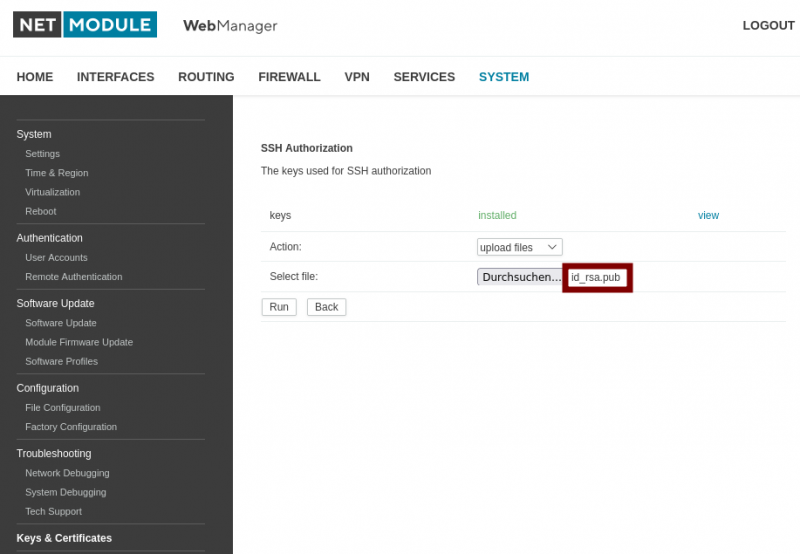
Once all of this has been completed, you can run the Python script ssh_start.py, and the frame interval will be set in the GNSS module.
python3 ssh_start.py 10
# The Python script is called this way.
# Values from 1 to 10 can be passed as arguments.
USER
root@LXCNAME:~/ubx_neo_m8l# python3 ssh_start.py 10
Setze gpsd.1.status=0 …
Versuch 1/2: call set_cfg_rate_neom8l.py on…
STDOUT:
STDERR: 2026-09-30 10:39:20,427 INFO instantiating GnssUBlox on tty
2026-09-30 10:39:20,428 INFO using device /dev/ttyUSB1
Traceback (most recent call last):
serial.serialutil.SerialException: device reports readiness to read but returned no data (device disconnected or multiple access on port?)
root@LXCNAME:~/ubx_neo_m8l#
Then test the whole thing with a get script.
USER
root@LXCNAME:~/ubx_neo_m8l# python3 get_cfg_rate_neom8l.py
2026-09-30 11:53:44,917 INFO instantiating GnssUBlox on
tty
2026-09-30 11:53:44,917 INFO using device /dev/ttyUSB1
UBX-CFG-RATE cls:06 id:08
measRate: 100
navRate: 1
timeRef: 0
root@LXCNAME:~/ubx_neo_m8l#
Download the set_cfg_rate_neom8l.py python script:
show code
- set_cfg_rate_neom8l.py
#!/usr/bin/python3
import sys
import logging

from ubxlib.server_tty import GnssUBlox
from ubxlib.ubx_cfg_rate import UbxCfgRate
from ubxlib.ubx_cfg_cfg import UbxCfgCfgAction

FORMAT = '%(asctime)-15s %(levelname)-8s %(message)s'
logging.basicConfig(format=FORMAT)
logger = logging.getLogger('ubxlib')
logger.setLevel(logging.INFO)

if len(sys.argv) != 2:
    print(f"Usage: {sys.argv[0]} <frame interval in Hz>   (allowed: 1-10)")
    sys.exit(1)

try:
    rate_hz = int(sys.argv[1])
    if not (1 <= rate_hz <= 10):
        raise ValueErro
except ValueError:
    print("Error: frame interval must be an integer between 1 and 10")
    sys.exit(1)

ubx = GnssUBlox('/dev/ttyUSB1')
ubx.setup()

msg = UbxCfgRate()
msg.set_rate_in_hz(rate_hz)
msg.f.timeRef = 0

ack_nak = ubx.set(msg)
print(f"CFG-RATE ({rate_hz} Hz) result:", ack_nak)

# Save permanently
save_msg = UbxCfgCfgAction()
save_msg.save(UbxCfgCfgAction.MASK_All)   # includes all categories, inc RxmConf
ack_nak_save = ubx.set(save_msg)
print("CFG-CFG (save) result:", ack_nak_save)

ubx.cleanup()
Download the ssh_start.py python script:
show code
- ssh_start.py
#!/usr/bin/python3
"""
Establish an SSH connection (key-based) to the router, briefly disable gpsd
(wwanmd toggles the port from down to up, leaving it briefly free), and within that window
call set_cfg_rate_neom8l.py with the desired rate_hz value, and then
re-enable gpsd.

Calling the subroutine:
python3 run_set_rate.py <rate_hz>
"""
import paramiko
import subprocess
import time
import sys

HOST = "192.168.1.1"                  # The router's IP address as seen from the container
PORT = 22
USER = "root"
SSH_KEY_PATH = "/root/.ssh/id_rsa"    # Path to the private SSH key
RETRY_COUNT = 2                       # attempts
RETRY_DELAY = 0.5                     # Seconds between attempts


def run_remote_command(client, cmd):
    stdin, stdout, stderr = client.exec_command(cmd)
    out = stdout.read().decode().strip()
    err = stderr.read().decode().strip()
    status = stdout.channel.recv_exit_status()
    return status, out, err


def main():
    if len(sys.argv) != 2:
        print(f"Usage: {sys.argv[0]} <rate_hz>   (allowed: 1-10)")
        sys.exit(1)

    try:
        rate_hz = int(sys.argv[1])
        if not (1 <= rate_hz <= 10):
            raise ValueError
    except ValueError:
        print("Error: rate_hz must be an integer between 1 and 10.")
        sys.exit(1)

    # Establish an SSH Connection to the Router ''Key-Based''
    key = paramiko.RSAKey.from_private_key_file(SSH_KEY_PATH)

    client = paramiko.SSHClient()
    client.set_missing_host_key_policy(paramiko.AutoAddPolicy())
    client.connect(HOST, port=PORT, username=USER, pkey=key, timeout=10)

    try:
        # Disable gpsd -> wwanmd toggles the port; it is open for a short time
        print("Set gpsd.1.status=0 ...")
        run_remote_command(client, 'cli set -s gpsd.1.status="0"')

        success = False
        for attempt in range(1, RETRY_COUNT + 1):
            print(f"Experiment {attempt}/{RETRY_COUNT}: call set_cfg_rate_neom8l.py on...")
            result = subprocess.run(
                ["python3", "set_cfg_rate_neom8l.py", str(rate_hz)],
                capture_output=True, text=True, timeout=10
            )
            print("STDOUT:", result.stdout)
            if result.stderr:
                print("STDERR:", result.stderr)

            if result.returncode == 0 and "SerialException" not in result.stderr:
                success = True
                break

            time.sleep(RETRY_DELAY)

        if not success:
            print("Note: set_cfg_rate_neom8l.py failed to run successfully in all attempts.")

    finally:
        # Turn gpsd back on
        print("Set gpsd.0.status=1 ...")
        run_remote_command(client, 'cli set -s gpsd.1.status="1"')
        client.close()

if __name__ == "__main__":
    main()
Download the library ubxlib:
Program library ubxlib for the Python script / Link
The password for downloading the library : gnss_cfg_rate
Download the get_cfg_rate_neom8l.py python script:
show code
- get_cfg_rate_neom8l.py
#!/usr/bin/python3
"""
Retrieves the current UBX-CFG-RATE configuration (navigation rate) from the module
"""
import logging

from ubxlib.server_tty import GnssUBlox
from ubxlib.ubx_cfg_rate import UbxCfgRatePoll

FORMAT = '%(asctime)-15s %(levelname)-8s %(message)s'
logging.basicConfig(format=FORMAT)
logger = logging.getLogger('ubxlib')
logger.setLevel(logging.INFO)

ubx = GnssUBlox('/dev/ttyUSB1')
ubx.setup()

poll_msg = UbxCfgRatePoll()
response = ubx.poll(poll_msg)
print(response)

ubx.cleanup()


